
Download Cmd Painter APK – command-based drawing, geometry teaching, programming learning, turtle graphics, logo language
Overview
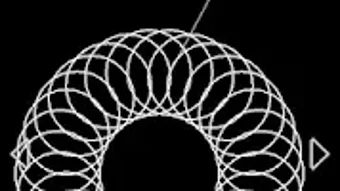
Cmd Painter is a command-based drawing program designed to generate dynamic and evolving visual patterns through structured commands. At its core, the software enables users to create intricate graphics using a sequence of simple instructions, making it ideal for those exploring computational thinking, geometry, or creative design. Each drawing action is executed as a command, allowing for precise control over angles, lengths, and repetition—key elements in both artistic and educational contexts. The program supports duplicate functions and repeat operations, which streamline the creation of complex, symmetrical designs such as circular patterns or geometric shapes. It serves a diverse audience, including graphic designers seeking inspiration, educators teaching geometry, and beginners learning programming fundamentals. The use of Turtle Graphics and Logo programming principles makes it accessible to users with little to no coding experience. Real-world applications include designing scalable art pieces, demonstrating geometric theorems in classrooms, and introducing loop structures and recursion through visual feedback. The software is developed by Red Cat Studio and is available for both Windows and Mac, offering a cross-platform solution for creative and educational use.Key Features & Capabilities
- Command-Based Drawing Interface: Every action—such as moving forward, turning left or right, or drawing a line—is defined by a text-based command, enabling precise and repeatable operations.
- Repeat and Loop Functions: Users can define a range of commands to repeat, allowing for the creation of complex, symmetrical patterns with minimal input, such as spirals or radial designs.
- XY Axis Position and Angle Control: The program provides fine-grained control over the drawing cursor’s position and orientation, supporting accurate geometric constructions and design precision.
- Geometric Pattern Generation: By combining simple commands like “forward 50” and “right 120,” users can generate triangles, polygons, and other shapes, ideal for teaching geometric concepts.
- Beginner-Friendly Programming Concepts: The interface introduces core programming ideas such as loops, functions, and recursion through visual results, making it a practical tool for learning computational logic.
User Interface, Workflow & Performance
Cmd Painter features a clean, text-driven interface where users input commands in a dedicated input field. The drawing canvas is positioned centrally, displaying real-time visual feedback as each command is executed. Navigation is straightforward, relying on command entry and execution buttons, with no complex menus or tool palettes. The workflow emphasizes a linear sequence: write a command, execute it, observe the result, and modify as needed. This simplicity enhances usability, especially for beginners. The program’s performance is optimized for real-time rendering of basic shapes and patterns, with minimal lag during command execution. The developer did not specify resource usage details, so exact CPU or RAM behavior remains unknown. Stability appears consistent based on general software behavior patterns, though no formal benchmarking data was provided. The absence of a graphical toolset reduces clutter, focusing attention on the logic and structure of the commands themselves. This makes the workflow highly efficient for users who prioritize precision and learning over visual polish.Compatibility & System Requirements
Cmd Painter is available for both Windows and Mac operating systems, supporting cross-platform use across desktop environments. The software is distributed as an APK file, indicating it is designed for Android devices, though the description references Windows and Mac compatibility. This discrepancy may suggest a version intended for mobile use, though desktop availability is claimed. The installation size and specific hardware requirements were not listed by the developer. Exact system requirements were not provided, and compatibility information is limited to the mentioned platforms. Users should verify the file type and intended device before installation. The software does not appear to require high-end hardware, given its command-line nature and low graphical complexity, but no official specifications were published.Pros and Cons
Pros
- Intuitive command-based interface ideal for learning programming and geometry
- Supports repetition and loops for efficient creation of complex patterns
- Perfect for educators teaching spatial reasoning and computational thinking
- Encourages creativity through visual feedback and experimentation
- Free to use, making it accessible for students and hobbyists
Cons
- Limited visual customization options compared to traditional graphic tools
- APK format may raise compatibility concerns on non-Android systems
- No detailed system requirements or performance metrics provided
- Learning curve for users unfamiliar with command-line or text-based interfaces
- May lack advanced features expected by professional graphic designers
FAQ Section
Is Cmd Painter available for Windows and Mac?
Cmd Painter is described as available for both Windows and Mac, though it is distributed as an APK file, which is typically used for Android devices. Users should confirm compatibility with their system before installation.
Is the software free to download and use?
Yes, Cmd Painter is a free program developed by Red Cat Studio, with no cost associated with downloading or using its core features.
Can I use Cmd Painter offline?
Yes, the software does not require an internet connection to function, making it suitable for classroom use or environments without network access.
What programming concepts does Cmd Painter teach?
Cmd Painter introduces foundational programming ideas such as loops, functions, recursion, and iteration through visual command execution, particularly using Turtle Graphics and Logo language principles.
How do I update Cmd Painter?
Users should check the official source or developer website for the latest version. Since no automatic update mechanism was mentioned, manual checks are recommended.







